
Zeus MD AE: DICOM Publisher and Medical Image Archive
Publish. Archive. Protect.
One of a kind: the only solution in the world that publishes DICOM discs and archives them offline in one system. Zeus MD AE publishes studies to labeled Blu-ray discs, then stores and indexes them in a lockable, fire-resistant-coated disc cabinet, taking your most sensitive patient information offline.
- DICOM publisher
- Offline archive
- AES 256-bit
- WORM
- VA-listed DICOM burner software
- Made in the USA
1 · Publish
DICOM Discs, Automated
Query/Retrieve from PACS, or burn from a web browser. Viewer included on every disc.
2 · Archive
Store Discs Offline
A DS900 cabinet stores and indexes finished discs, 1,960 per cabinet.
3 · Protect
Go Dark
Offline storage keeps patient data out of reach of ransomware.
From Modality to Protected Archive
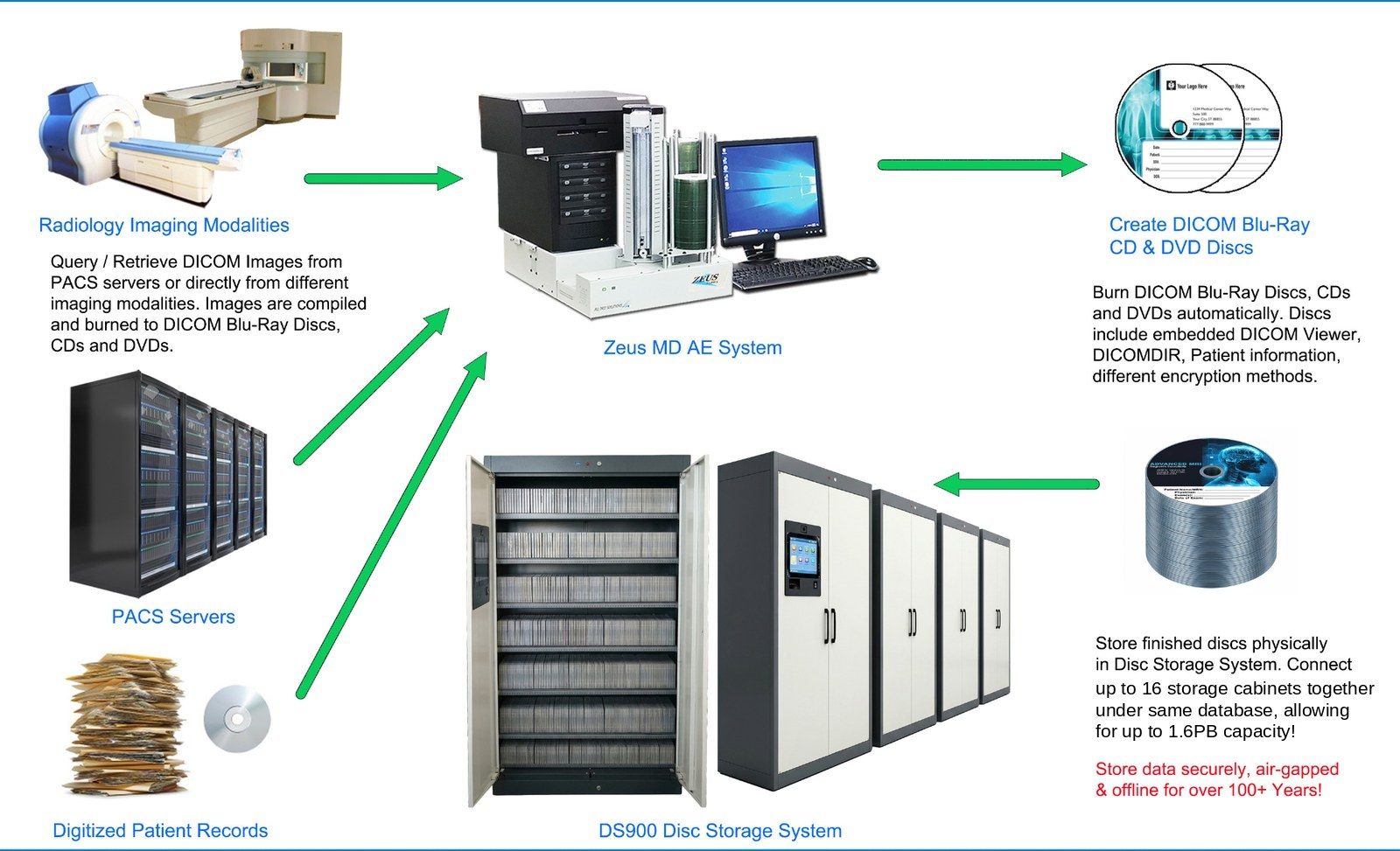
Medical data keeps growing, and so do ransomware, cybercrime and lost or stolen records. Zeus MD AE moves studies from your network servers to a protected offline archive.
Retrieve
Studies are queried and retrieved from PACS servers or directly from imaging modalities, as they arrive.
Publish
Zeus 4H MD BD burns DICOM Blu-ray, CD and DVD discs automatically, with labels printed on the disc.
Archive
The DS900 stores, indexes and tracks finished discs. Link up to 16 cabinets under one database.
 View full size
Automated DICOM Publishing from PACS or a Web Browser
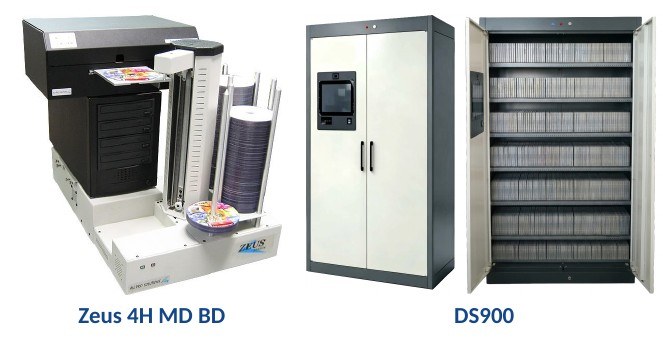
The Zeus 4H MD BD is a self-contained DICOM publisher. It has an embedded Windows 11 PC with all DICOM software preinstalled, 4 Blu-ray combo drives and a 420-disc capacity.
- Auto-burns studies as received – Query/Retrieve from PACS, or burn from a web browser.
- Color labels on the disc – Speedjet color label printing with off-the-shelf HP ink cartridges.
- Viewer on every disc – DICOMDIR and Weasis viewer included.
- AES 256-bit encryption – with disc spanning for large studies.
- Keeps running – the picker lifts multiple discs, so you can add or remove discs while jobs run, 24/7.
- No limits – on copies or third-party media.
Looking for the publisher alone? See the Zeus MD Series DICOM publishers.
Archive Medical Images to Blu-ray Discs
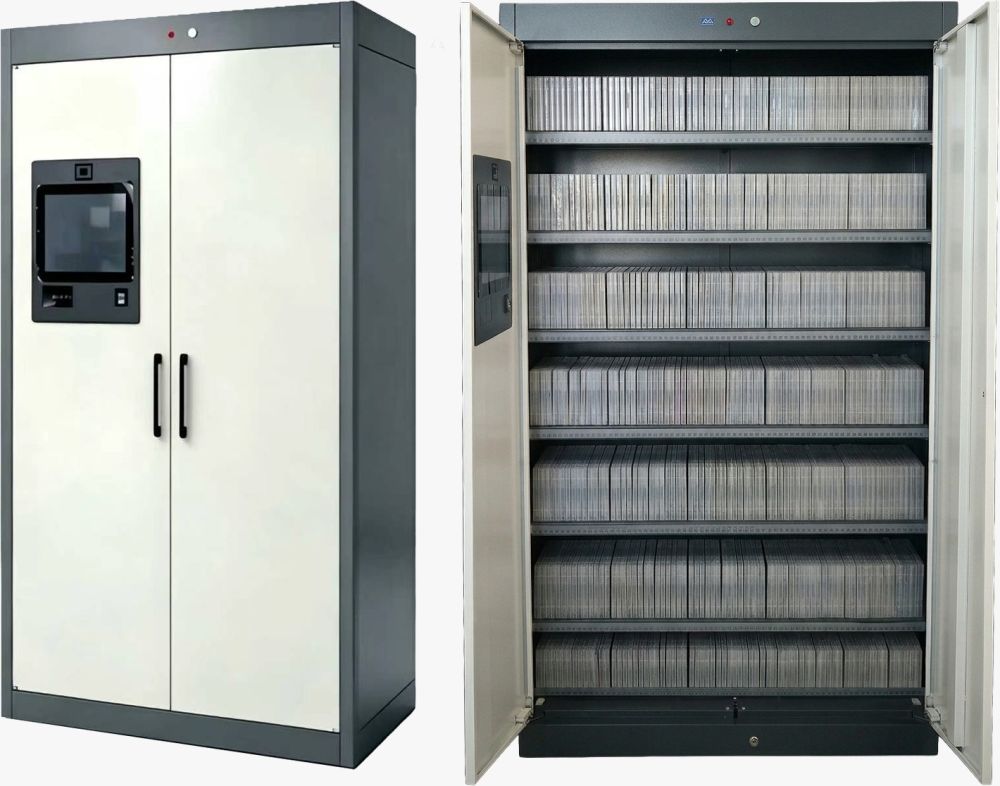
The DS900 disc storage cabinet keeps finished discs offline, indexed and out of danger. It works as a removable library, so staff can quickly grab discs in an emergency, while off-network storage avoids recurring cloud fees.
- Secure cabinet – rugged metal with a door lock and fire-resistant paint coating.
- Pinpoint retrieval – LED lights mark each disc, and a barcode scanner and labels are included.
- Embedded touchscreen PC – Disc Manager database software with a web browser or portal dashboard.
- Secure access – fingerprint, RFID card reader and facial recognition.
- Chain of custody – tracked, indexed and access-controlled.
420publisher discs
1,960archive discs per cabinet
100TBper cabinet
1.6PBup to 16 linked cabinets
Ransomware Protection for Medical Imaging with Offline Storage
Ransomware can encrypt or delete studies on any connected storage, including the backups beside it. Going dark with offline storage keeps a separate copy out of reach.
Connected storage
Cloud, NAS and imaging servers
Always online, so attackers can reach imaging studies and the backups beside it.
Air-gapped
Offline Blu-ray imaging archive
Discs sit in a cabinet with no network connection, out of reach of remote attacks.
After a cyber incident, a department with an offline imaging archive can restore studies from discs instead of rebuilding from scratch.
Listed on the VA's Approved DICOM Modality Interfaces
All Pro Solutions DCMburner v6.14, the DICOM software behind our CD/DVD burners, appears under CD/DVD Burners on the VA's VistA Imaging Approved DICOM Modality Interfaces list (November 2026).
Patient Discs with an Included Viewer and Encryption
Every disc is ready to hand to a patient, referring physician or outside facility. Discs include the embedded DICOM viewer, DICOMDIR and patient information, with your choice of encryption, and labels printed directly on the disc.
- Blu-ray, CD and DVD – write speeds up to BD-R 12X, DVD 24X and CD 52X, varying by media.
- Large studies – disc spanning with AES 256-bit encryption.
- Digitized patient records – publish and archive them alongside imaging.
Archive Benefits
Ransomware protection
Air-gapped offline storage keeps archives safe from cyberattacks.
Immutable WORM storage
Archived data cannot be modified or deleted.
Long-term preservation
100+ years on archival Blu-ray discs.
Optimized primary storage
Moves inactive data offline to free production storage.
Fast search & retrieval
Indexed search and random access to archived files.
Lower total cost
Less energy, maintenance and storage cost than HDD or tape.
Regulatory support
Data integrity and chain of custody to help meet requirements.
Scalable storage
Expand capacity as your data grows.
Long-Term Medical Image Archive Without Monthly Fees
Archival Blu-ray discs are rated for 100+ years of preservation, and archived data cannot be modified or deleted. You own the discs and the cabinet, so there is no subscription, and no migration to new hardware every few years.
Cost Behavior Over Time
Optical archive: one capital purchase. No subscription, power, cooling or migration cost for the 100+ year life of the media.
Cloud / server / tape: costs compound, with subscription fees, hardware refresh every 3–10 years, migration labor and rising storage tiers as data volume grows.
Illustrative only. Actual costs vary by data volume and contract.
Built for Hospitals, Imaging Centers and Health Systems
| Facility | How it is used |
|---|---|
| Hospitals and health systems | Publish patient and referral discs, archive studies offline |
| Radiology and imaging centers | Automate patient CDs and keep an offline copy of every study |
| Diagnostic labs and specialty clinics | Distribute results and archive digitized records |
| VA and federal medical centers | DICOM burner software listed on the VA's approved interfaces list |
| Research facilities | Preserve imaging datasets for the long term |
Specifications at a Glance
| Zeus 4H MD BD publisher | DS900 archive cabinet |
|---|---|
| 420 discs, 4 Blu-ray combo drives | 490 slots, 1,960 discs, approx. 100TB |
| Windows 11 Pro, Intel quad-core i5, 32GB DDR4 | Embedded touchscreen, web dashboard |
| 256GB SSD + 4TB HDD cache | 40 × 69 × 12 in (W × H × D), 200 lbs |
| Speedjet Pro color printer | Expands up to 16 units, 1.6PB |
| Max write: BD-R 12X, DVD 24X, CD 52X* | Embedded Disc Manager database software |
Both units: 100/1000 Ethernet, 115V or 230V, 40–95°F, 20–90% humidity. FCC, CE, RoHS. *Actual write speeds vary by media type and manufacturer. Specifications subject to change without notice.
Blu-ray vs Cloud for Medical Image Storage
How an offline Blu-ray archive compares with cloud, local servers, external drives and LTO tape.
Storage Medium Scorecard
How each option performs on the factors that matter most for long-term data storage.
| Factor | Blu-ray archive | Cloud storage | Local server / NAS-SAN | External HDD | LTO tape |
|---|---|---|---|---|---|
| Air-gapped / network isolation | Excellent | Poor / high risk | Poor / high risk | Fair / limited | Fair / limited |
| True WORM immutability | Excellent | Poor / high risk | Poor / high risk | Poor / high risk | Fair / limited |
| EMP / magnetic-field immunity | Excellent | Poor / high risk | Poor / high risk | Poor / high risk | Poor / high risk |
| Zero recurring / subscription cost | Excellent | Poor / high risk | Poor / high risk | Fair / limited | Fair / limited |
| No forced migration cycle | Excellent | Fair / limited | Poor / high risk | Poor / high risk | Poor / high risk |
| Court-ready chain of custody | Excellent | Fair / limited | Poor / high risk | Poor / high risk | Fair / limited |
| You own and control the data | Excellent | Poor / high risk | Excellent | Excellent | Excellent |
| Verified media lifespan | 100+ yrs | 3–5 yrs* | 3–5 yrs | 3–5 yrs | 15–20 yrs |
Excellent (3 dots)Fair / limited (2 dots)Poor / high risk (1 dot)
Archival Media Lifespan
Years of verified durability before the medium must be replaced or migrated.
Archival Blu-ray
100+ yrs
LTO tape (media)
15–20 yrs
Tape drive hardware
5–10 yrs
Local server HDD
3–5 yrs
External HDD
3–5 yrs
*Cloud storage feels permanent, but your data still lives on the vendor's physical hard drives underneath, with the same 3–5 year hardware lifespan as a local server, just outsourced. It also depends on continued subscription payments and the vendor remaining in business and honoring its contract.
Download the Storage Comparison One-Sheet (PDF)Frequently Asked Questions
Can Zeus MD AE publish discs directly from PACS?
Yes. It uses DICOM Query/Retrieve to pull studies from PACS servers or directly from imaging modalities, then burns them automatically to DICOM Blu-ray, CD or DVD discs. Studies can also be burned on demand from a web browser.
What viewer is on each disc?
Compatible with widely used viewers such as Philips, Weasis, RadiAnt, OsiriX, eFilm, ONIS, Syngo FastView, and many more
Are the discs encrypted?
Yes. Zeus MD AE supports AES 256-bit encryption, with disc spanning for large studies.
What is the difference between Zeus MD and Zeus MD AE?
Zeus MD publishes DICOM discs. Zeus MD AE (Archive Edition) adds the DS900 disc storage cabinet, so the same system also stores and indexes finished discs offline.
How much can the system hold?
The Zeus 4H MD BD publisher holds 420 discs and has 4 Blu-ray combo drives. Each DS900 cabinet holds 1,960 discs, about 100TB, and up to 16 cabinets link together for up to 1.6PB.
How does offline storage help after a ransomware attack?
Ransomware can only encrypt or delete what it can reach. Discs stored offline in a locked cabinet have no network connection, so a clean copy of your studies stays available.
How long do archived discs last?
Archival Blu-ray discs are rated for 100+ years of long-term preservation, and archived data cannot be modified or deleted.
Is it listed on the VA's approved DICOM modality interfaces list?
All Pro Solutions DCMburner v6.14 appears under CD/DVD Burners on the VA's VistA Imaging Approved DICOM Modality Interfaces list (November 2026).
Who can access the stored discs?
The DS900 has a touchscreen panel with fingerprint, RFID card and facial recognition. LED lights show the location of each disc, and a barcode scanner tracks them.
Do retention rules affect what we archive?
Retention requirements for imaging records vary by state and by organization. The archive supports your own policies. Check with your compliance officer for what applies.
Related Solutions
Data Archiving & Offline Storage
Choose the Solution for Your Industry
Standard Archiving & Storage
Automated Blu-ray archiving and air-gapped offline storage for government, finance, education and enterprise IT.
Learn more →Law Enforcement
Archive body camera, in-car and interview room video and digital evidence offline.
Learn more →Records Scanning & Archiving
Scan paper records, books, microfilm and microfiche, then archive and store them offline.
Learn more →Medical – Zeus MD AE
Publish DICOM discs and archive patient studies offline in one system.
You are herePublish. Archive. Protect.
Talk with our team about Zeus MD AE for your hospital or imaging center.
Request a QuoteCall +1-803-980-4141